
Skip to content
Apple CarPlay for Porsche, checked by PCM version

Porsche Apple CarPlay in Dubai

Whether your Porsche can run CarPlay depends on the infotainment unit inside it, not on the badge. We read the PCM version first, then tell you if CarPlay is already there, can be switched on, or needs added hardware, with a written quote before any work.

  • Built inWired from 2017, wireless from 2020 on many models
  • Switched onSome PCM 4 cars by licence
  • AddedOlder PCM units by hardware
Porsche interior with a center infotainment screen
Check the installed PCM
Plan your upgrade

Porsche CarPlay installed-price estimates

These planning ranges include the described work and a 5% VAT allowance. They are estimates, not a fixed offer or confirmation of stock. Your written quote names the product and the total before ordering.

Work Estimated AED total Included and excluded
Connection diagnosis and setup 250–450 System identification, connection checks and supported phone pairing. Parts, licenses and official software updates are separate.
Compatible interface installation 1,800–4,500 Module, standard harness, routine fitting, configuration and handover checks. Additional camera or audio adapters and existing faults cost extra. CarPlay does not change speaker quality, see our Porsche audio upgrade options guide for that.
Customer-supplied kit fitting 450–1,000 Installation and testing labor after kit acceptance. Hardware, missing cables and repairs are excluded.
Earlier-generation PCCM Plus 6,500–10,000 Planning allowance for a matching earlier unit, standard fitting hardware and installation. Map media, unusual adapters and repairs are separate.
Eligible factory activation Individual quote License eligibility and the authorized provider must be confirmed. Ask for license, programming and any provider charges in one total.
New-generation PCCM Plus Individual quote 997.2/987.2 and 991.1/981 products need a current regional part and installation quote. The earlier-unit range does not price these products.

Do not add a diagnosis fee to an installation package automatically. Ask whether it is included or credited. BOSE or Burmester integration, MOST fiber-optic audio, camera converters and previous modifications can change the total.

Compatibility

CarPlay by model, PCM and year

Use this as a starting guide. Installed hardware, software, market specification and previous modifications determine compatibility. A VIN describes original equipment but does not prove which unit is installed today.

Model and years Usual unit Wired from factory Wireless from factory Usual route
911 997.1 and Boxster or Cayman 987.1, relevant 2005–2008 cars PCM 2 series Matching earlier PCCM Plus with USB CarPlay
Cayenne first generation, 2003 to 2008 PCM 2 series Matching earlier PCCM Plus with USB CarPlay
911 997.2 and Boxster or Cayman 987.2, relevant 2009–2013 cars PCM 3.0 Matching new-generation PCCM Plus with wireless CarPlay, or a verified interface
911 991.1 and Boxster or Cayman 981, relevant 2012–2016 cars PCM 3.1 Matching new-generation PCCM Plus with wireless CarPlay, or a verified interface
Cayenne 958 and Panamera 970, to 2016 PCM 3.1 Interface module
Macan, 2014 to 2016 PCM 3.1 Interface module
911, Panamera and Cayenne, from 2017 PCM 4 or newer Factory, wireless on later years
718 Boxster and Cayman, 2017 onward PCM 4 Check factory option. Added hardware is a separate possibility.
Macan, 2017 to 2018 PCM 4 Check factory option. Added hardware is a separate possibility.
Macan, model year 2019 PCM 4 Porsche licence activation where not fitted
911 992, Cayenne, Macan, from 2020 Newer PCM Check software and build date. Relevant Macan and Cayenne wireless guidance specifies production from November 2019.
Taycan, from 2020 Porsche current unit Factory
Panamera, wireless from 2021 Check fitted PCM and software Factory
Macan Electric from MY2024 and Cayenne Electric from MY2026 Current unit Factory
AvailableDepends on order, year or activationNot from factory
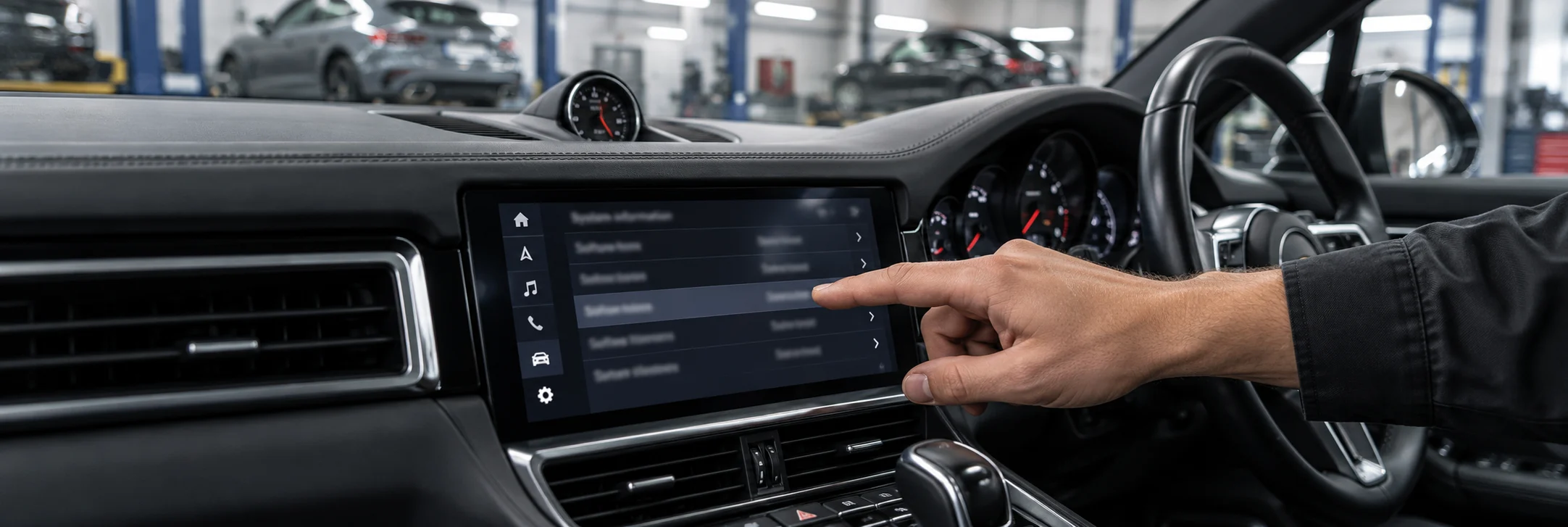
Porsche infotainment system information screen
System version and software
Two different jobs

Activation or retrofit, which one does your car need?

They sound similar but they are different work. Activation turns on a function the unit already has. Retrofit adds hardware the unit never had. Choosing the wrong one wastes money, so the route is only confirmed after the PCM version and options are read from your car.

Your PCM version
Route one

Activation

For eligible units, a licensed function can be enabled without replacing the screen. Porsche documents Macan activation using a license and an online PIWIS procedure. Eligibility, regional license availability and the authorized provider must be confirmed before offering this work. A software patch is not the same as Porsche-authorized activation.

  • No new hardware in the dashboard
  • Original screen, controls and sound stay as they are
  • Only possible where Porsche offers the function for that unit
  • Licence availability can vary by region
Best when the unit allows it
Route two

Retrofit

For older units such as PCM 3.0 and 3.1 that were never built for CarPlay. An interface or replacement unit adds the phone projection and connects it to the screen and sound system.

  • Hardware fitted behind the dashboard
  • Video and audio paths are added or rerouted
  • Some functions may change, explained before fitting
  • Porsche Classic units are an option on some older models
The route for most cars before 2017
Wired and wireless

How the connection works on each type

Porsche lists wired CarPlay from 2017 and wireless from 2020 on many models, with Panamera wireless from 2021. Wireless needs the latest software and can vary by country.

Factory wiredPCM 4 and later
  1. Phone plugged into the USB port with a data cable
  2. CarPlay starts on the centre screen
  3. Sound, calls and voice use the car system
  4. Unplugging ends the session
Factory wirelessMany models from 2020
  1. Phone paired once in the PCM menu
  2. Reconnects automatically on later drives
  3. Needs current software on the car
  4. Uses more phone battery than a cable
Retrofit wirelessOlder units with added hardware
  1. Interface or replacement unit creates the link
  2. Picture shown through an added video input
  3. Sound routed through an available audio path
  4. Behaviour depends on the hardware chosen
Controls and sound

What usually stays, and what we check

On factory CarPlay everything is designed together. On a retrofit, each control and sound path has to be confirmed for your exact unit. We list the result before you approve.

Driver hand on a Porsche steering wheel near the voice and media buttons
Steering controls
  • 1
    Steering wheel buttonsTrack and volume usually work. Voice button behaviour depends on the unit.
  • 2
    MicrophoneFactory systems use the car microphone. Some retrofits add a small one.
  • 3
    Touch and rotary controlTouch screens may pass touch through. Older units may use the rotary knob.
  • 4
    Original sound systemConfirm amplifier retention, including BOSE or Burmester. Audio may need AUX or a compatible digital adapter.
  • 5
    Cameras and parkingReversing camera and parking display must still switch in. We test this.
  • 6
    Original menusFactory navigation, radio and car settings should remain reachable.
Retrofit hardware

Three kinds of hardware for older units

We describe the types, not brands. Which type suits your car depends on the PCM version, the screen, the sound system and what you want to keep.

Type A

External interface module

A small box behind the dash adds a video input to the original PCM and shows CarPlay on the factory screen. Audio may use AUX or a compatible digital interface. MOST integration and microphone, camera or steering-button retention depend on the exact kit and vehicle. The quote must identify the product and supported functions.

Keeps the original PCMCheck TV tuner and audio path
Type B

Internal module board

A board fitted inside or directly onto the unit. The supplier instructions must match the exact unit and firmware. Internal connections, AUX requirements and recovery options differ between products. Opening the unit can also affect existing warranty cover.

Compact once fittedMore delicate to install
Type C

Replacement unit

The original unit is replaced. Porsche Classic offers PCCM and PCCM Plus for selected older models, including USB CarPlay units for earlier 996/986, 997.1/987.1 and Cayenne E1 applications. New-generation versions for applicable 997.2/987.2 and 991.1/981 cars add wireless CarPlay. Confirm regional part number and availability.

Factory look on supported modelsModel specific versions
CarPlay retrofit module and wiring laid beside a removed Porsche head unit on a workbench
Module and wiring
The check

How a CarPlay check runs at our workshop

An initial check identifies the appropriate next step. Nothing is ordered or fitted until you have seen the result and approved the route.

01

Read the unit

We open the system information screen and read the PCM version, software level and fault memory through diagnostics. We compare those details with the applicable equipment and product documentation before confirming eligibility.

02

Map what you have

We note the sound system, cameras, TV tuner, steering buttons and microphone, because each one decides how a retrofit or activation will behave in your car.

03

Explain the route

You get one recommended route with the reason, plus any alternative. If CarPlay is already present and simply not set up, we explain the setup work and agreed charge without selling an unnecessary retrofit.

04

Quote in writing

Parts, activation, labour and time are listed separately. Hardware warranty and who handles a claim are named on the quote.

05

Fit and test with you

After the work we test calls, music, maps, voice, steering buttons and the reversing camera with your own iPhone before handover.

Quote checklist

What we record before we quote

Start with your Porsche model and what you want to do. We identify the technical details during assessment and explain the parts, fitting and limitations before you approve.

Send the model, year and a photo of the system information screen if you can, and we can often give a first answer by WhatsApp.

CarPlay quote sheetCompleted with you
  1. PCM version and part numberRead from the system screen and fault memory
  2. Current audio pathFactory amplifier, premium sound and inputs in use
  3. Cameras fittedReversing camera and surround view if present
  4. Steering wheel controlsWhich buttons you want to keep working
  5. MicrophoneFactory microphone or an added one
  6. TV tunerWhether a factory TV module is installed
  7. Wired or wirelessYour preference and what the unit allows
  8. Warranty statusAny remaining cover you want to protect
Route agreedParts listedLabour stated
Already have CarPlay?

Common CarPlay faults we check first

Many CarPlay problems are settings, cables or software rather than failed hardware. We rule out the simple causes before suggesting any part.

Will not connectCheck the phone CarPlay settings, the cable and that the USB port supports data.

Keeps droppingWorn cables and loose ports are common. Wireless sessions can drop with interference.

Picture but no soundAudio source selection, volume levels and on retrofits the audio input.

Wireless option missingPorsche says wireless needs the latest software and varies by country.

Calls sound poorMicrophone position, phone settings and on retrofits the added microphone.

Screen freezesPhone and car software versions, then the unit itself through diagnostics.
USB connection in a Porsche center console
USB connection
Honest limits

Things CarPlay cannot change

These notes apply before any route is chosen, so you know the limits up front.

  1. 1

    CarPlay presents compatible iPhone apps through a driving-focused interface. It does not upgrade the car screen, the speakers or the original navigation maps.

  2. 2

    On 718 and Macan from 2017 to 2018, Porsche states CarPlay is only available if the option was ordered when the car was first bought.

  3. 3

    Activation is only possible where Porsche offers it for that unit, and licence availability can vary by region.

  4. 4

    Wireless CarPlay on factory systems needs current software, and Porsche notes it may vary by country.

  5. 5

    A retrofit can change how some original functions behave. We explain any change before fitting.

  6. 6

    Standard CarPlay does not imply support for CarPlay Ultra or every iPhone app. Buy only the features documented for the exact vehicle and product being supplied.

Example quotations

Three ways a CarPlay enquiry can be priced

These illustrative quotations are not completed customer jobs, confirmed offers or evidence of stock. Each total includes the described labor and a 5% VAT allowance.

2021 Cayenne connection checkAED 350

Example for identifying a supported factory system, checking pairing and the phone connection, then testing calls and audio. No new unit, license, official software update or repair parts are included.

2015 Macan interface installationAED 2,800

Example for a compatible module, standard harness, routine fitting and handover checks. Assumes supported original equipment. The exact kit, microphone and wired or wireless features must be named before approval. Extra camera or audio adapters are separate.

2018 718 customer-supplied kitAED 700

Example labor charge for fitting and testing an accepted complete kit. The customer supplies the correct module and accessories. Missing parts, existing faults, software patches and hardware warranty are excluded.

Compare the complete installation, not just the module price. A cheaper kit may require an added microphone or a different audio connection. Confirm how you return to the original menus, how the camera takes priority and what happens after a future phone or vehicle update.

Warranty conditions

How warranty is handled on CarPlay work

Parts

Ask for the hardware supplier, warranty duration, exclusions and claim contact in writing before ordering. There is no universal warranty period for all kits.

Workmanship

Confirm the fitting warranty separately before approval, including inspection, removal and refitting charges if a unit needs a claim. Keep those terms with the invoice.

Not covered

Ask how phone faults, liquid damage, later software changes and unrelated vehicle faults are treated. Customer-supplied hardware claims normally depend on the seller’s terms.

Keep the quote and invoice together, because they name the parts, the supplier and the work done. If your car is still under any warranty, tell us before work. We explain how an added unit or activation may relate to it so you can decide.

Know your installation

Technical references for your installation

Reviewed 28 October 2026

Regional specifications and current vehicle-specific instructions take precedence. References describe the technology, not workshop authorization or stock. Page images do not verify a completed installation or compatibility with your car.

Questions

Porsche Apple CarPlay questions

Start with your model and question. Year and a system-screen photo can help but are optional for an initial enquiry.

Does my Porsche already have Apple CarPlay?

Porsche lists wired CarPlay from 2017 on 911, Panamera, Cayenne and Macan, and from 2020 on Taycan. On 718 and Macan from 2017 to 2018 it is only present if the option was ordered.

Which Porsche models have wireless CarPlay?

Porsche lists wireless from 2020 on 911, Taycan, Macan and Cayenne, from 2021 on Panamera, and on the electric Macan and Cayenne. It needs current software and may vary by country.

Can CarPlay be switched on without new hardware?

Sometimes. Eligible Macan applications have documented license-based activation. The unit, license and authorized provider must be checked. This is not a promise of activation for every PCM or confirmation of workshop access to Porsche online systems.

Can a 991 or 981 get CarPlay?

Applicable 991.1 and 981 cars commonly need a compatible interface or matching new-generation PCCM Plus. Do not extend this to every 991. Porsche lists factory CarPlay on 911 from model year 2017. Check the installed unit and options.

What about a 997, 987 or older Cayenne?

Porsche Classic offers PCCM and PCCM Plus units for these models. Which version fits depends on the year, so we check before ordering.

Will I keep my steering wheel buttons?

On factory CarPlay, yes. On a retrofit, track and volume usually work, and voice control depends on the hardware. We confirm before you approve.

Will my reversing camera still work?

It should, and it is one of the items we test at handover. The camera input is recorded on the quote sheet first.

Does CarPlay replace the Porsche navigation?

No. It adds iPhone apps such as maps and music on the screen. With a compatible interface, original menus should remain accessible. A replacement head unit can change the navigation system and map requirements, which must be explained before purchase.

Is Android Auto the same job?

The hardware is often shared, but factory support arrived at different times. See our Android Auto page for the answers that differ.

How much does CarPlay cost in Dubai?

Planning estimates are AED 250–450 for connection diagnosis and setup, AED 1,800–4,500 for a compatible interface installed, and AED 450–1,000 for accepted customer-supplied kit fitting. These include the described work and a 5% VAT allowance. Activation and new-generation PCCM Plus need individual quotes.

How long does the work take?

Allow roughly 30–60 minutes for an uncomplicated initial connection check and 3–6 working hours for a straightforward interface installation as planning estimates. Parts ordering, dashboard access, faults and provider availability can extend the job. Confirm the actual appointment and collection time before travelling.

My CarPlay stopped working, is the unit faulty?

Not necessarily. Check the cable, data-capable port, phone permissions, pairing and relevant software before condemning the unit. Persistent faults may require electrical diagnosis.

Does this upgrade include CarPlay Ultra?

No such promise is included. Standard CarPlay, CarPlay Ultra and aftermarket phone interfaces are different products. The quote should describe only the supported functions of the exact installation.

Do you fit hardware I bought online?

Talk to us first with the part details. It must suit your exact unit, and supplier warranty claims then go through the seller.

Apple CarPlay in Dubai

Find out what your Porsche can do before you buy anything

Send the model and year. We read the PCM version, tell you whether CarPlay is built in, can be activated or needs hardware, and quote the route in writing.

An enquiry is not a booking. Porsche Repair Dubai is an independent workshop and is not part of the Porsche Centre dealer network. Apple CarPlay is a trademark of Apple and we are not affiliated with Apple.

Call WhatsApp
Scroll to Top